
This screen shows logs for request acceptance, decline, and revocation within the specified time window range. To access the Supervision Request Activity screen, click the Supervision > Supervision Request Activity option under the Fleet Supervision menu.
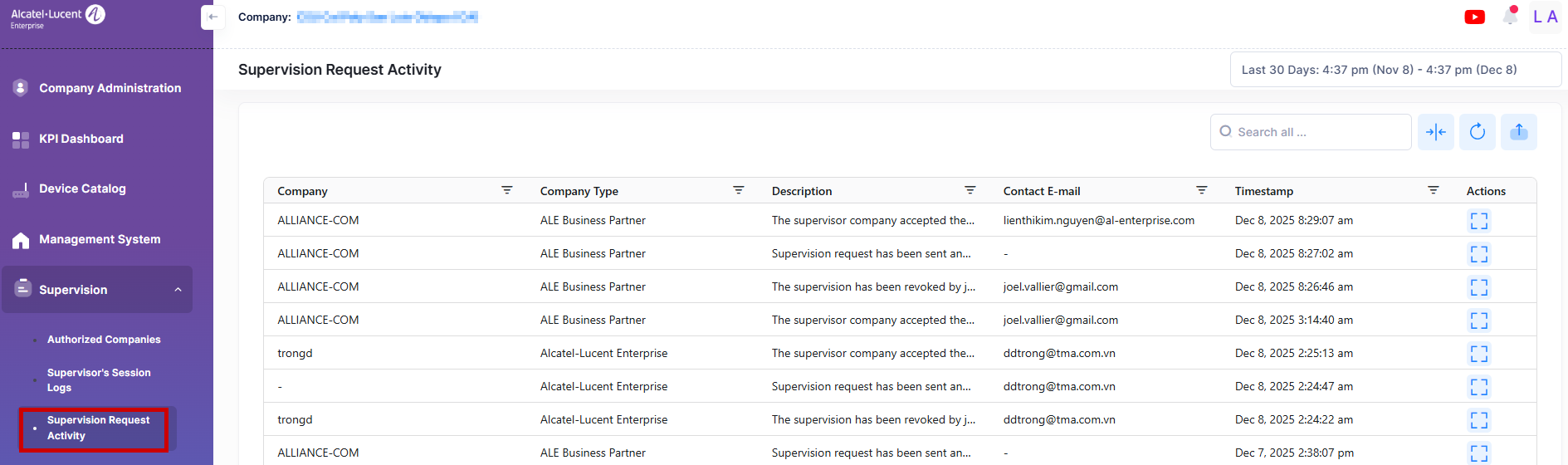
Data displayed can be exported into an Excel sheet format. You can also display the list in full-screen mode for a better display.
For each of the action logs, the following attribute values are provided:
-
Company - Name of the supervisor company.
-
Company Type - Type of the Supervisor company(Alcatel-Lucent Enterprise or ALE Business Partner).
-
Description - It provides the description of the action performed by the supervisor.
-
Contact E-mail - Specifies the contact e-mail of the supervisor.
-
Timestamp - Specifies the date and time at which the action has been performed.