
This section shows activity logs for accepting, declining, expired and revoking supervision requests within the specified time range. To access the Supervision Request Activity screen, click the Supervision > Supervision Request Activity option under the Fleet Supervision menu.
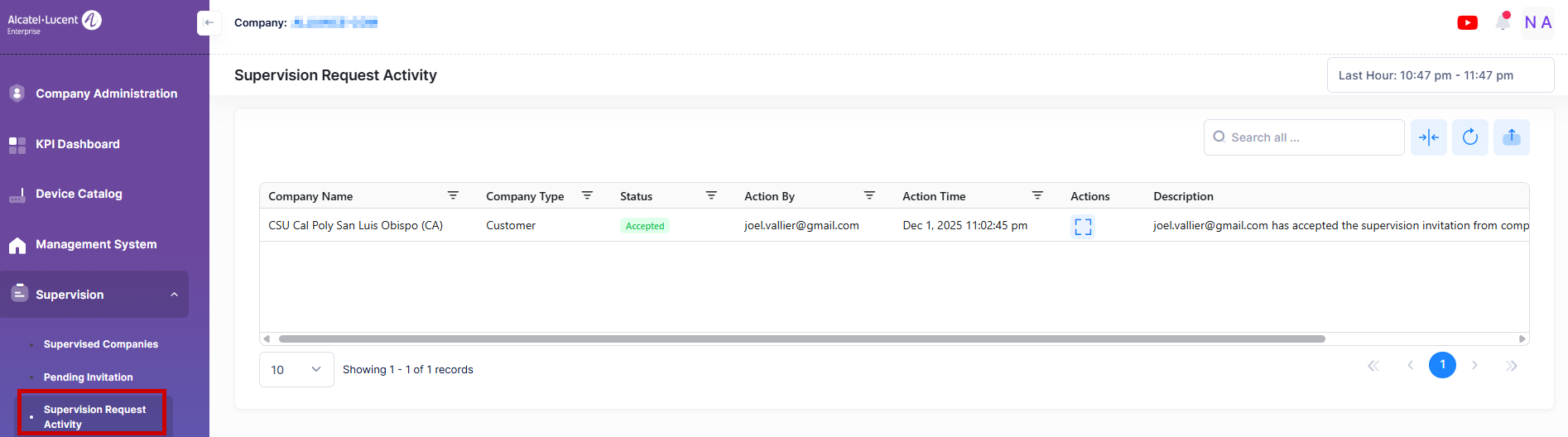
Data displayed in each widget can be exported into an Excel sheet format. You can also switch the widgets to full-screen mode for a better display.
The information displayed on this screen is defined below:
-
Company Name - The name of the company raised the supervision request.
-
Company Type - The company type raised the supervision request.
-
Status - The current status of the request raised by the user.
-
Accepted - The request raised is accepted for supervision by the supervisor company.
-
Pending - The request raised is pending for approval for supervision by the supervisor company.
-
Expired - The request expired after 30 days because the supervisor company didn’t accept or decline it.
-
Declined - The supervisor company denied the supervision approval request.
-
Cancelled by Supervised - The company that raised the supervision request has revoked it.
-
Cancelled by Supervisor - The supervisor revoked access to the supervising company.
-
-
Action By - The user’s email initiated the supervision request.
-
Action Time - The date and time at which the supervision request is generated.
-
Description - The description of the activity.