
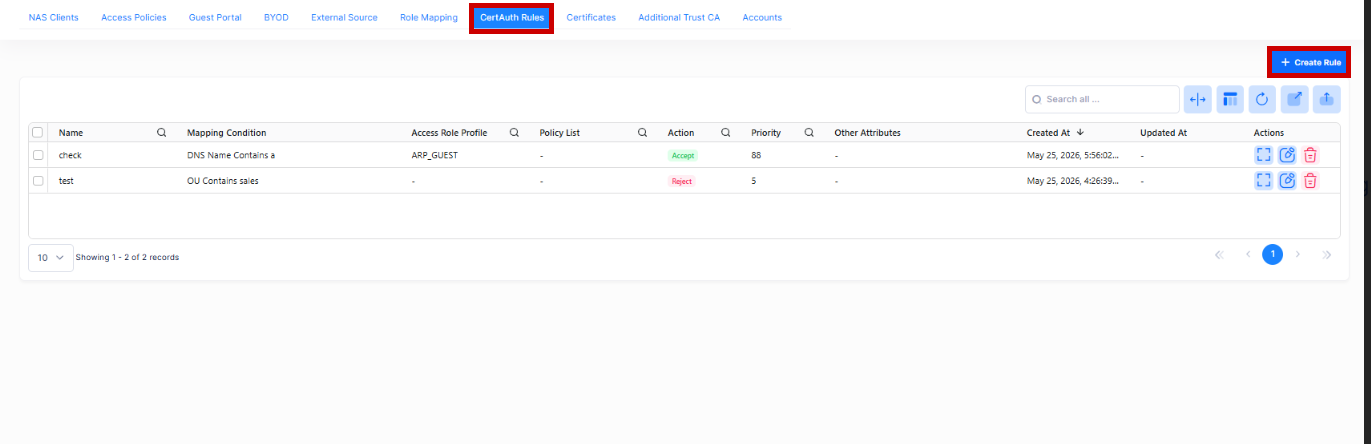
When an Access Policy uses the local database for authentication and EAP-TLS as the method, UPAM must support a local authorization method. Local authorization evaluates certificate-attribute-based rules against the authenticated client certificate to determine the network enforcement action (accept or reject). The Screen displays all configured certificate-attribute-based rules and is used to create, edit, and delete Certificate local authorization rules.
To access the Certificate Local Authorization Rules screen, click on Auth & Automation > UPAM-NAC > CertAuth Rules under the “Configure” section of the OmniVista Cirrus Menu.
Creating a New Rule
Click on Create Rule to bring up the New Certificate Local Authorization Rule Screen. Use this screen to define the following attributes for creating a new Rule:
When you are done configuring the attributes for the New Rule, click on Create button.
Basic Information

-
Name - Enter a rule name.
-
Precedence - Specify Rule Priority. A user requesting authorization may match several access policies and the one with highest priority will take effect after passing the authentication.
(Range = 1-99, 1 is the highest priority and 99 is the lowest priority)
Certificate Attribute Condition
Certificate attribute conditions specify what must match for this rule to apply for local authorization. At least one condition is mandatory. When multiple conditions exist, all must match before applying the authorization rule.

-
Attribute - Select the Certificate Attribute from the drop-down list. The list of Attribute Name with Description is given below.
-
Operator - Select a condition operator.
-
Value - Select a condition value. Enter at least one value. A maximum of 32 values are allowed.
Click on Add Condition to add another mapping condition to the Authorization Rule.
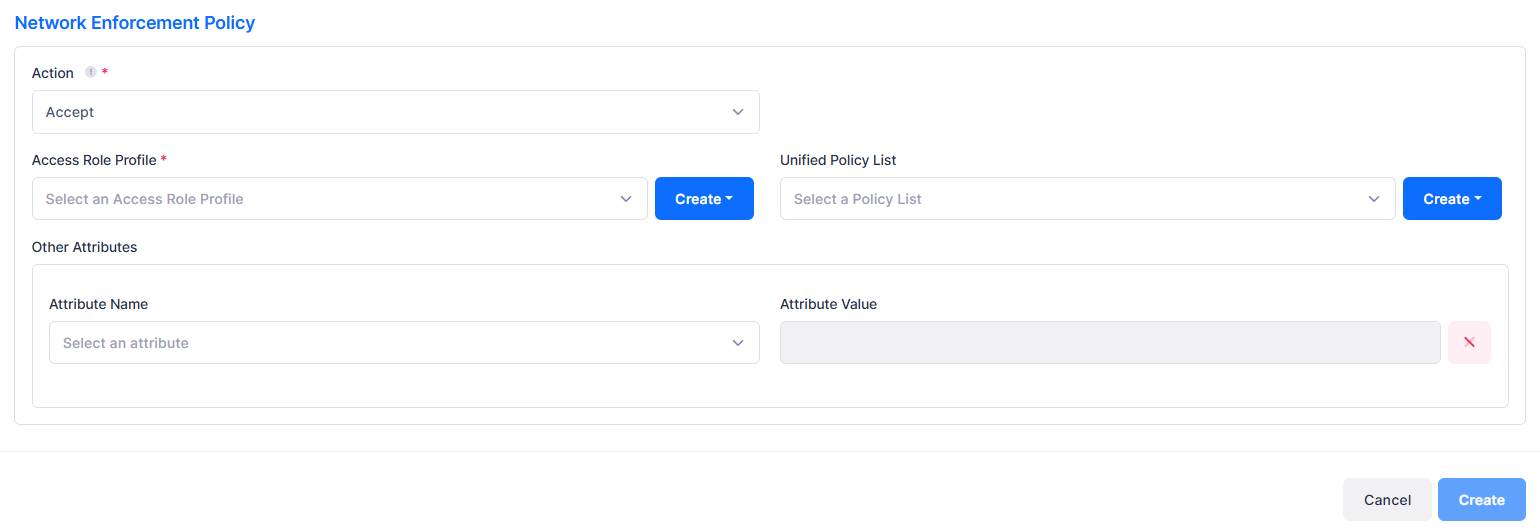
Network Enforcement Policy
-
Action - Accept or Reject user authentication with matching certificate attribute based rules.
-
Access Role Profile - Select the Access Role Profile from the drop-down list. If necessary, you can click on Create Access Role Profile to go to the Create Access Role Profile screen to create a profile.
-
Unified Policy List - Select a Unified Policy List from the drop-down list. If necessary, you can click on Create Unified Policy List to go to the Create Unified Policy List screen to create a policy list.
-
Other Attributes - Select the required attributes and provide values.
-
Acct-Interim-Interval - Interval for RADIUS accounting, in seconds. If not configured, the device's default accounting policy will take effect. (Range = 60 - 1200, Default = 600).
-
Session-Timeout - The Session Timeout Interval is the maximum number of consecutive seconds of connection allowed to the user before termination of the session or prompt. If not configured, the device's default session timeout policy will take effect. (Range = 12000 - 86400, Default = 43200).
-
Tunnel-Private -Group-ID - The Tunnel Private Group ID is used to determine the UNP for the device, if applicable. Tunnel Private Group ID is a RADIUS attribute that indicates the group ID for a particular tunnel session. It may be included in the Access-Request packet if the tunnel initiator can pre-determine the group resulting from a particular connection, and should be included in the Access-Accept packet if this tunnel session is to be treated as belonging to a particular private group. In most cases, L2 VLAN domain is a private group, and the Tunnel Group ID is pointing to the VLAN ID. (Range = 1 - 4094)
-
WISPr-Bandwidth-Max-Down - The user downstream bandwidth, in kbit/s. Value must be in range [0 - 2147483]. By default or set it to 0, it is not limited.
-
WISPr-Bandwidth-Max-Up - The user upstream bandwidth, in kbit/s. Value must be in range [0 - 2147483]. By default or set it to 0, it is not limited.
-
Certificate Attributes List
|
Attribute Name |
Description |
|---|---|
|
O |
Organization from certificate Subject DN |
|
C |
Country from certificate Subject DN |
|
ST |
State from certificate Subject DN |
|
L |
Locality from certificate Subject DN |
|
|
Email address from Subject Alternative Name |
|
DNS Name |
DNS Name from Subject Alternative Name |
|
Serial Number |
Certificate serial number |
|
Issuer |
Certificate issuer (full DN |
|
CN |
Common Name from certificate Subject DN |
|
OU |
Organizational Unit from certificate Subject DN |
Editing a Rule
You can edit the parameter values for an existing Certificate Local Authorization Rule by accessing the Edit screen.
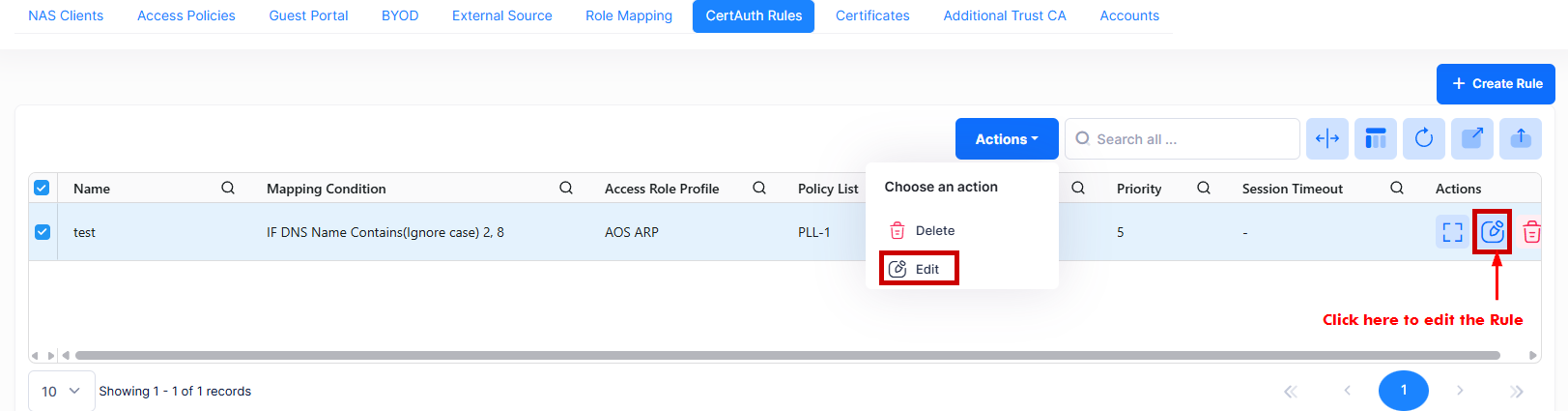
Use one of the following methods to access the Edit Certificate Local Authorization Rule screen (as shown above):
-
Select the rule name to edit by clicking on the checkbox next to the rule name, click on Actions, then select Edit from the drop-down menu.
-
Click on the pencil icon under the “Actions” column next to the rule name that you want to edit.
The following Edit screen displays. Edit the fields as described above, then click on Save.
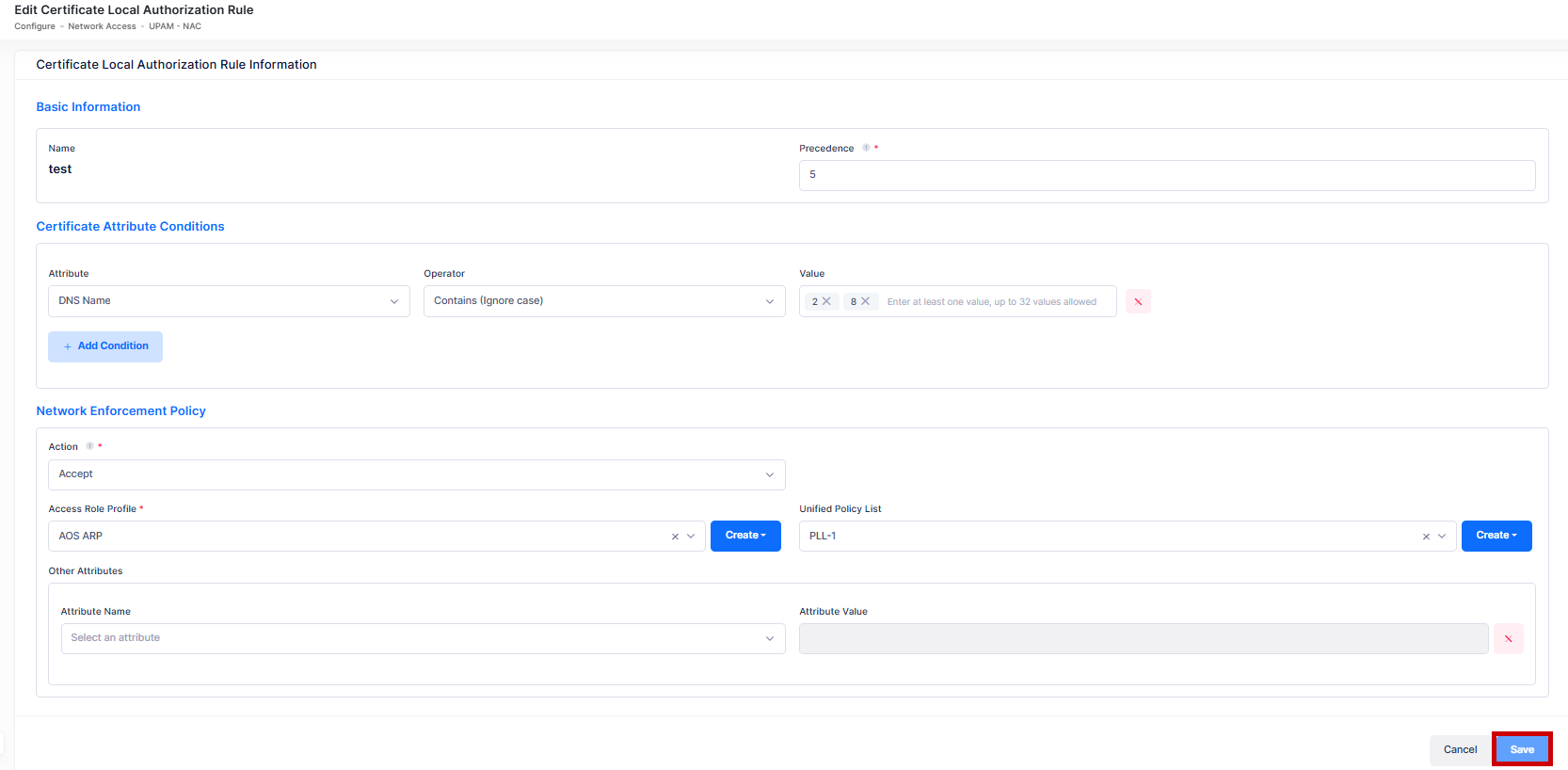
You cannot edit the Rule Name.
Deleting a Rule
To delete a Certificate Local Authorization Rule, use one of the following methods to select the rule you want to delete:
-
Select the rule to delete by clicking on the checkbox next to the rule name, click on Actions, then select Delete from the drop-down menu.
-
Click on the trash can icon under the “Actions” column next to the rule name that you want to delete.
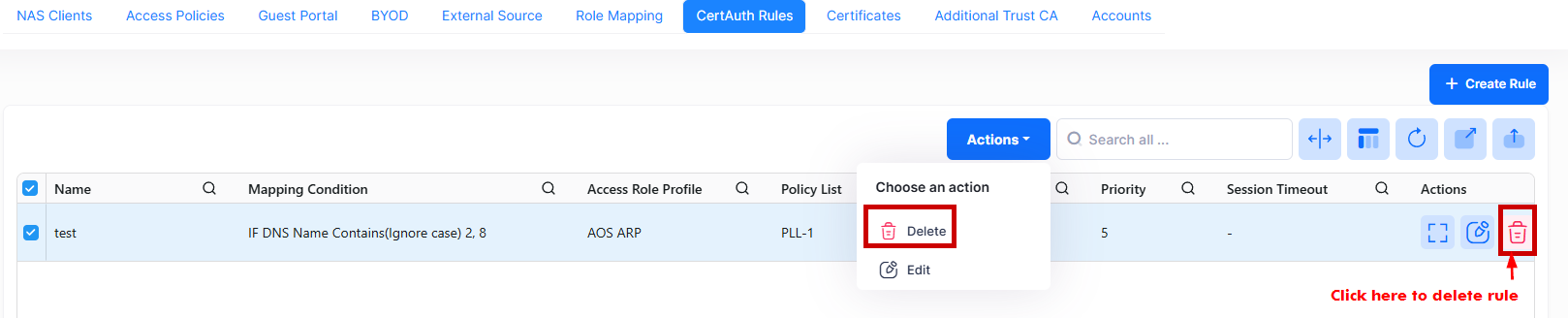
When you select the rule you want to delete, the following confirmation prompt appears:
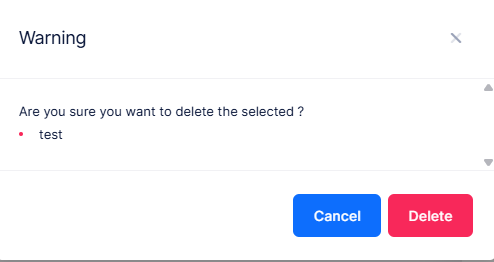
Click on Delete to confirm that you want to delete the Rule.
Display Certificate Local Authorization Rule
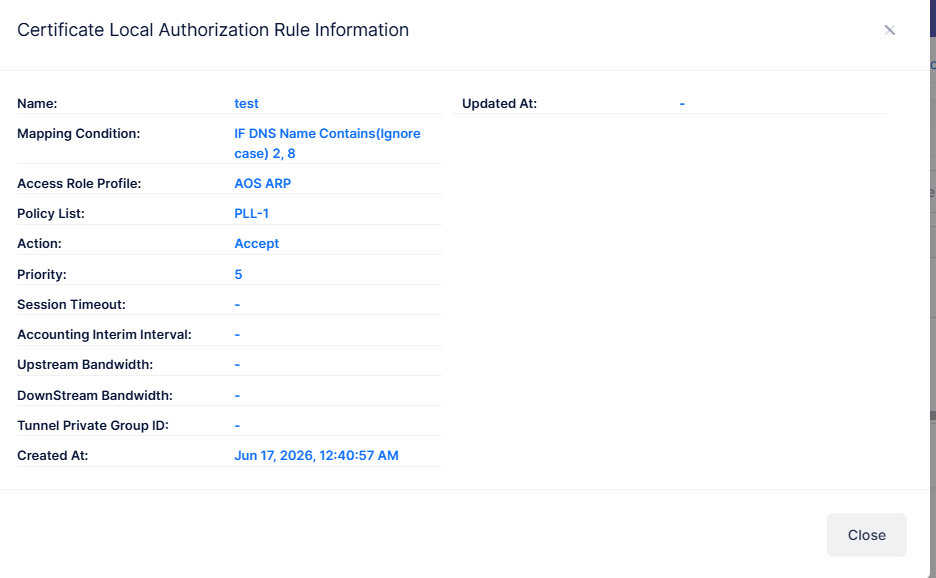
The Certificate Local Authorization Rule list displays information for the certificate attribute based rules. To display detailed information about a specific rule, click on the Additional Information icon under the “Actions” column. The information displayed on this screen is defined below.
-
Name - The name of the Rule.
-
Mapping Condition - Specifies what condition must match for this rule to apply for local authorization. At least one condition is mandatory.
-
Access Role Profile - The name of the Access Role Profile applied for Network Enforcement.
-
Unified Policy List - The name of the Unified Policy List applied for Network Enforcement.
-
Action - Accept or Reject user authentication with matching certificate attribute based rules.
-
Priority - Specifies the Rule Priority.
-
Session Timeout - The maximum number of consecutive seconds of connection allowed to the user before termination of the session or prompt.
-
Accounting Interim Interval - Interval for RADIUS accounting, in seconds.
-
Upstream Bandwidth - The user upstream bandwidth, in kbit/s.
-
Downstream Bandwidth - The user downstream bandwidth, in kbit/s.
-
Created At - The date and time the rule was created.
-
Updated At - The date and time the rule was last updated.
-
Tunnel Private Group ID - The Tunnel Private Group ID is used to determine the UNP for the device, if applicable.