
The Global Configuration DHCP Option 82 is used to configure the DHCP Option 82 Feature for Access Points. DHCP Option 82 allows a DHCP Relay Agent to insert specific information into a request that is being forwarded to a DHCP Server.
The DHCP Option 82 screen is used to configure global settings for DHCP Option 82. The DHCP Option 82 is enabled or disabled is a part of creating an Access Role Profile. To access this screen, click on Wireless > Advanced > DHCP Option 82 under the “Configure” section of the OmniVista Cirrus Menu.
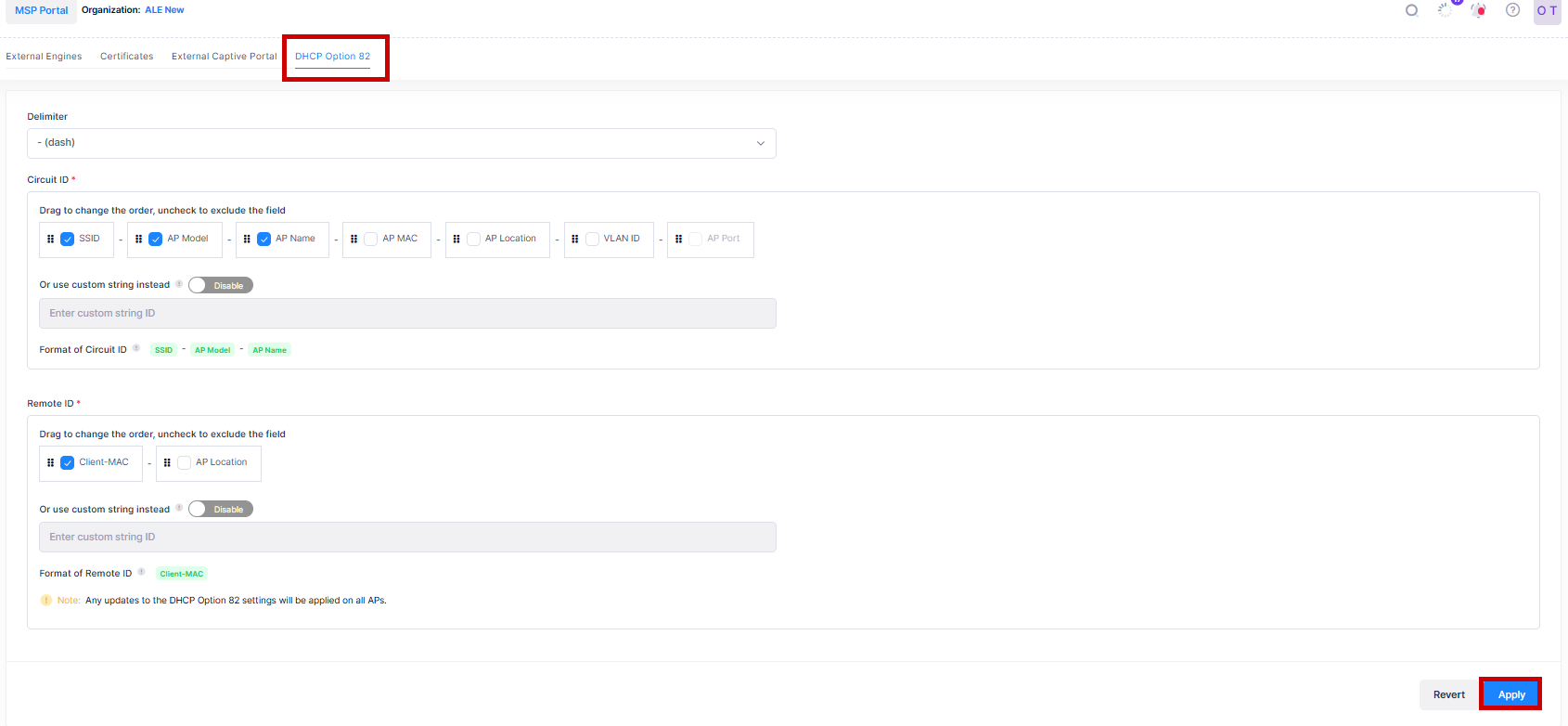
Configure the fields as described below and click on Apply to save the configuration.
-
Delimiter - Select the character to use as a delimiter between values specified in the Circuit ID field options from the drop-down menu list.
-
Circuit ID - The Circuit ID field options includes information about the network device that received the client request.
-
SSID - The SSID of the network to which the client is connecting.
-
AP Model - The model of the AP to which the client is connecting.
-
AP Name - The name of the AP to which the client is connecting.
-
AP MAC - The MAC address of the AP to which the client is connecting.
-
AP Location - The location of the AP to which the client is connecting.
-
VLAN-ID - The VLAN to which the client is connecting.
-
AP-Port - The AP downlink port to which the client is connecting.
-
Custom Circuit ID - Enter a custom Circuit ID. This feature is disabled by default. If enabled, enter a custom string ID.
-
Format of Circuit ID - Displays the order of substrings in the final Circuit ID format string.
-
-
Remote ID - The Remote ID field options is used to include the client information.
-
Client-MAC - The MAC address of the client connecting to the network.
-
AP Location - The AP Location of the client connecting to the network.
-
Custom String ID - Enter a custom Remote ID. This feature is disabled by default. If enabled, enter a custom string ID.
-
Format of Remote ID - Displays the order of substrings in the final Remote ID format string.
-
When entering a custom Circuit ID or Remote ID, you can use the "$" character in the input string. The position of "$" defines the string. For example, in the custom string "$$vlan-$ssid-$apmac", the first "$" indicates a custom parameter string, and the following "$" characters indicate required parameters.