
AIVA (AI Assistant) is an AI-powered assistant integrated into Advisor Edge to help network administrators with the following tasks:
-
Creating custom anomaly detections using plain-language descriptions.
-
Delivering AI-powered network alerts directly into Rainbow team bubbles, where you can escalate any anomaly to AIVA for immediate analysis.
Consider the following when using AIVA with Advisor Edge:
-
Your Organization must have an active Advisor Edge subscription or trial license.'
-
A Rainbow Account is required to receive network alert notifications and interact with AIVA Bot in Rainbow. See Network Alerts and AIVA in Rainbow.
-
Required permissions to access the Advisor Edge instance for anomaly management.
-
You can refer to the Troubleshooting/FAQs section below for assistance.
Creating Custom Anomalies With Natural Language
In OmniVista Advisor Edge, AIVA can help you define and create custom anomalies without knowing the technical anomaly format. Describe what you want to detect in plain language, and AIVA translates your description into a valid anomaly definition, confirms the details with you, and creates the anomaly on your behalf.
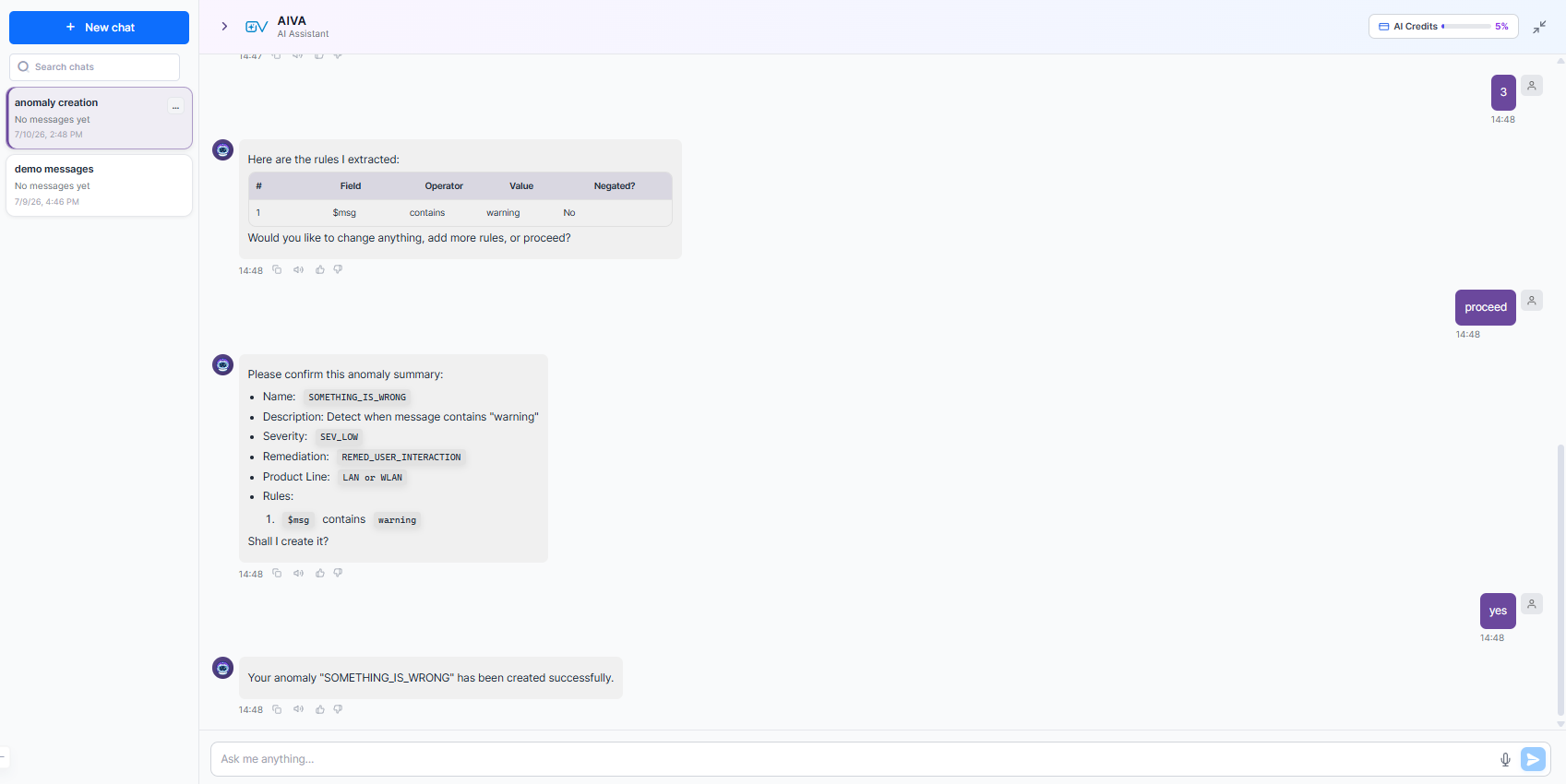
To create custom anomalies using AIVA, complete the following steps:
-
Navigate to Configure > Advisor Edge > Anomalies and open the AIVA panel.
-
Describe the anomaly you want to create in plain language. For example: "Create an anomaly that detects when a log message contains the word 'warning'". AIVA extracts the detection rules from your description and displays them in a table showing the “Field”, “Operator”, “Value”, and whether the rule is “Negated”. Review the extracted rules.
-
To refine the rules, type your changes in plain language (for example, "add another rule" or "change the severity"). To accept the rules as shown, type proceed. AIVA presents a full anomaly summary for confirmation, including:
-
-
Name - The generated anomaly identifier.
-
Description - What the anomaly detects.
-
Severity - The severity level assigned.
-
Remediation - The remediation type.
-
Product Line - The applicable product line (for example, LAN or WLAN).
-
Rules - The complete list of detection rules.
-
-
When AIVA asks "Shall I create it?", type yes to confirm. AIVA creates the anomaly and confirms: "Your anomaly [name] has been created successfully."
To modify a created anomaly, go to Configure > Advisor Edge > Anomalies and edit it from the anomalies list. For more information about anomaly configuration, refer to Managing Advisor Edge Anomalies.
Delivering AI-Powered Network Alerts Into Rainbow
OmniVista Network Advisor can deliver network anomaly alerts directly into Rainbow (Alcatel-Lucent Enterprise collaboration platform) team bubbles. Each alert appears as an interactive notification card, and you can escalate any alert to AIVA for deeper analysis without leaving Rainbow.
An active OmniVista Network Advisor (OVNA) subscription is required to use AIVA in Rainbow. This feature is not available without OVNA.
Rainbow Bot Account Setup
Before enabling Rainbow notifications, you must verify the following:
-
Use a dedicated service account - The Rainbow account used by the AIVA bot must be a dedicated service account, not a personal user account. Every time the notification service starts, the service renames the configured account to “AIVA by OmniVista”. If a personal account (for example, one belonging to a named individual) is used instead, that person’s Rainbow contact card is renamed to “AIVA by OmniVista” and appears under that name to all other Rainbow users. This is highly disruptive. Replace any personal account with a dedicated bot account before deploying this feature.
-
Bot account renaming is not protected - Rainbow does not provide a mechanism to prevent users from manually renaming the bot account. If the bot account is renamed between service restarts, the name will not revert to “AIVA by OmniVista” until the next restart of the notification service.
Responding to Network ID Cards
When a network anomaly is detected, a notification card appears in the relevant Rainbow bubble.
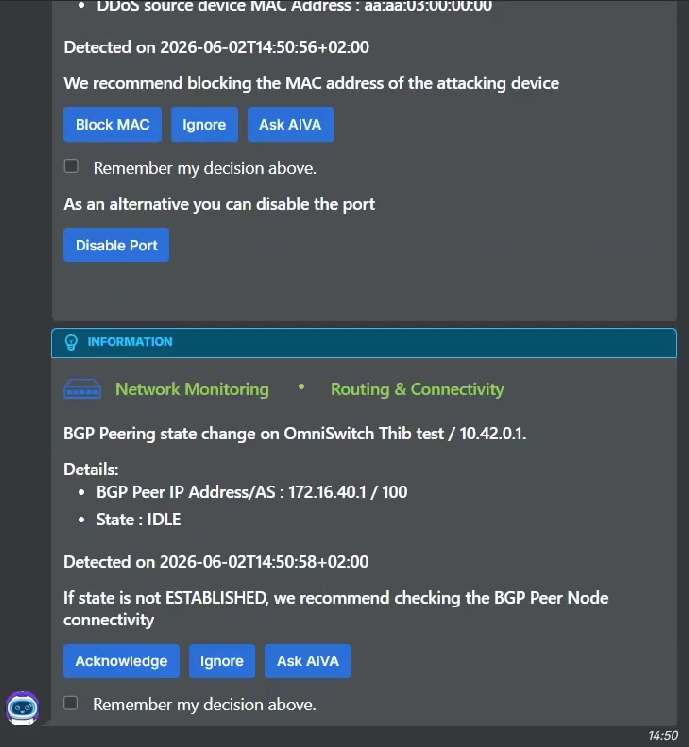
Each card includes:
-
Alert details - The anomaly type, affected device, and detection timestamp.
-
Recommended action - For example, "We recommend blocking the MAC address of the attacking device".
-
Action buttons - One or more of the following:
-
Block MAC / Acknowledge / Ignore - Take an immediate action on the alert.
-
Ask AIVA - Escalate the alert to AIVA for AI-powered analysis.
-
-
Remember my decision above - Check this box to apply the same action automatically to similar future alerts.
Asking AIVA About an Alert
When you click Ask AIVA on a network alert card in the Rainbow bubble, a private direct conversation with AIVA Bot opens automatically (or resumes if one already exists). This private conversation is separate from the team bubble, so other participants are not disturbed.
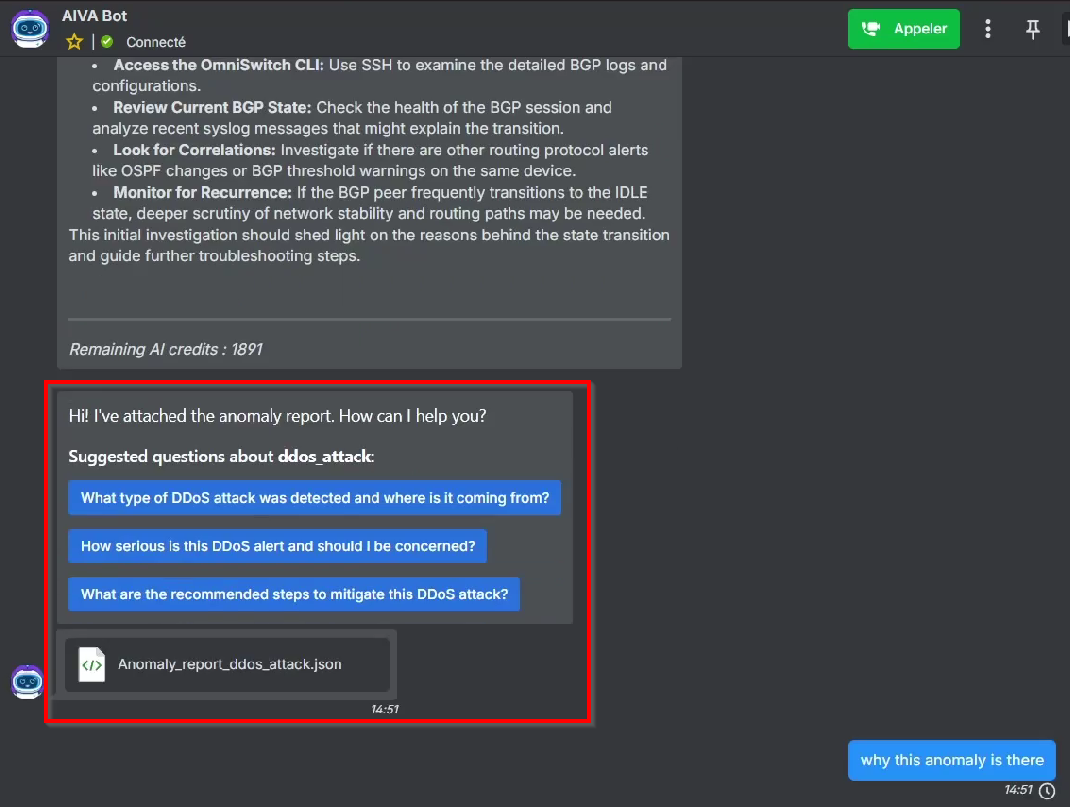
In the AIVA Bot conversation, the following interaction occurs:
-
AIVA attaches a detailed anomaly report (for example,
Anomaly_report_ddos_attack.json) to the conversation and greets you: "Hi! I've attached the anomaly report. How can I help you?". -
AIVA shows context-aware suggested questions tailored to the anomaly, such as:
-
"What type of DDoS attack was detected and where is it coming from?"
-
"How serious is this DDoS alert and should I be concerned?"
-
"What are the recommended steps to mitigate this DDoS attack?"
-
-
Click a suggested question or type your own question. AIVA analyzes the anomaly and provides a detailed response with root-cause analysis, investigation steps, and recommendations.
-
Continue the conversation as needed. AIVA retains the history of your interaction with it across sessions.
The remaining AI credit balance is displayed at the bottom of AIVA's responses in Rainbow. Contact your administrator if credits are running low.
Troubleshooting/FAQs
AIVA is not available in Rainbow
Verify that your Organization has an active OmniVista Network Advisor (OVNA) subscription. AIVA in Rainbow is only available when OVNA is deployed. Contact your administrator if you are unsure of your subscription status.
No "Ask AIVA" button appears on alert cards
The AIVA integration with Rainbow may not be configured for your organization. Contact your OVNA administrator to confirm that the Rainbow notification service is set up and that AIVA is enabled.
AIVA Bot does not respond in Rainbow
Check that the AIVA Bot is listed as a participant in your Rainbow bubble. If it is absent, contact your administrator to re-add the bot to the bubble. Also verify that your OVNA deployment is running correctly.
Anomaly creation was rejected or failed
Review the summary AIVA presented before confirmation — the anomaly name, severity, or rules may not have matched the expected format. Start a new conversation and rephrase your description, being specific about the field, condition, and value you want to detect.
AIVA extracted incorrect rules from my description
After AIVA shows the extracted rules, type corrections in plain language before proceeding. For example: "Change the operator to 'equals'" or "Set the severity to high". Do not type proceed until the rules are correct.
AI credits are running low in Rainbow
The remaining AI credit balance is shown at the bottom of AIVA's responses. Contact your OVNA administrator to review or replenish the credit balance.
AIVA Bot appears under a person’s name in Rainbow
The notification service renames the configured bot account to “AIVA by OmniVista” on every restart. If a personal user account was used instead of a dedicated service account, that person’s Rainbow contact card is renamed and appears as “AIVA by OmniVista” to all users. Contact your OVNA administrator to replace the personal account with a dedicated bot service account.
The AIVA Bot account name was changed and is not reverting
Rainbow does not prevent users from manually renaming the bot account. The name reverts to “AIVA by OmniVista” only when the notification service restarts. To resolve this, restart the notification service. To prevent recurrence, restrict bot account renaming within your Rainbow organization settings.