
When the Status field on the Organization Widget indicates that the Trial License has expired, click on the View organization icon to open the Renew License form.
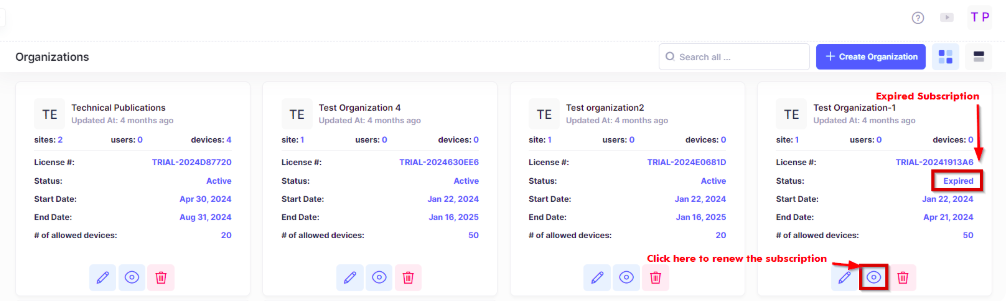
A Renew Subscription form is displayed. On this form, you have the option to renew the Trial License or directly apply a paid CAPEX Subscription to the Organization.
Renew Subscription
Renewing an expired Trial License requires a Trial Activation Code from your Business Partner.
When you select the “Renew Subscription” option, the form displays the fields that you need to complete to renew the Trial License.
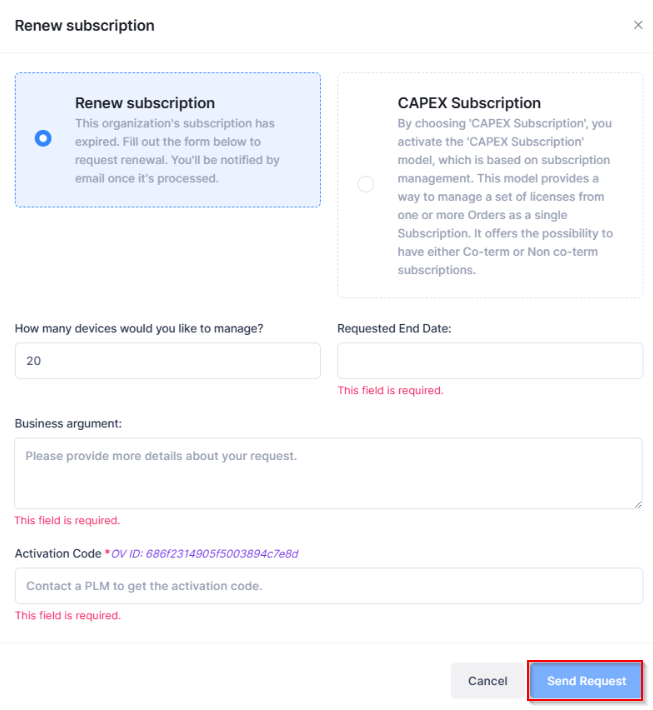
Complete the following fields on the Renew Subscription form as necessary and click on Send Request.
-
How many devices would you like to manage? - Enter the number of devices that you would like to manage with this license.
-
Requested End Date - Enter the new end date for the license.
-
Business argument - Enter a required explanation as to why you want to renew the license.
-
Activation Code - Enter the Trial Activation Code provided by your Business Partner.
CAPEX Subscription
When you select the “CAPEX Subscription” option, the form displays the fields required to apply for a paid CAPEX license subscription for the Organization.
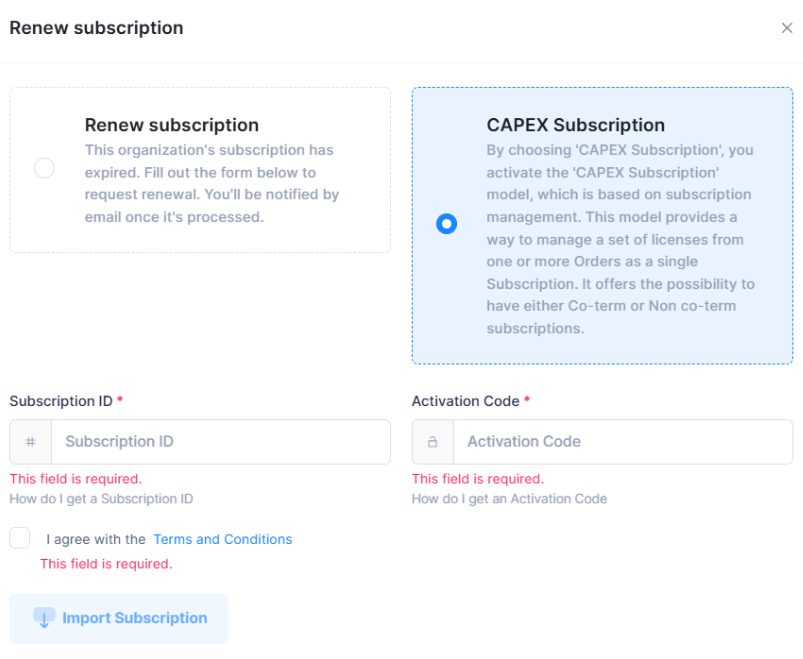
Complete the fields as described below, then click on Import in the lower-right corner of the form. You must complete the mandatory fields and agree to the Terms and Conditions.
-
Subscription ID - The CAPEX Subscription ID number obtained from the reseller or Business Partner who purchased the subscription.
-
Activation Code - The CAPEX Activation Code number you received in the licensing email.
-
Terms and Conditions - Click on the checkbox to accept the licensing terms and conditions. Proceed through the wizard steps to complete the import.
-
After successful import, the new license categories (including OVTX-ASL-MGT and OVTX-3PD-MGT) appear on the License Management screen.
-
If additional licenses (add-ons) have been ordered, click Extend/Renew, then import the new subscription file to synchronize the updated licenses.
The following screen displays the Import Licenses:
For more information about applying a CAPEX Subscription license, see the online help for Using the CAPEX Subscription model.
License Expiration and Renewal
OmniVista monitors subscription expiration and displays warnings when the license categories approach their end date.
Warning indicators:
-
When your subscription is within 30 days of expiration, a warning indicator appears next to the Renew Subscription tab.
-
If the subscription has expired but is within the grace period, a notification banner explains that you are in the Access Grace period.
Grace period behavior:
After expiration, a 90-day Access Grace period begins. During this period:
-
You can still access and manage your account.
-
When the grace period ends, switches lose access to centralized management data such as LDAP policies, and you lose access to network management configurations, logs, statistics, analytics, and locator data.
Renewing your subscription:
Click Extend/Renew and import the updated subscription file from Subscription Manager.
If your subscription has expired and the grace period has also ended, device management capabilities are restricted. Contact your reseller or business partner to renew the subscription through Subscription Manager, then import the updated subscription credentials