
Your basic User Profile is created from the information you enter when you create your Fleet Supervision Account (e.g., Name, Company Name, Password). However, you can edit your User Profile at any time.
Open the User Profile Menu by clicking on your initials in the upper-right corner of any screen, then select My Profile to bring up the My Profile screen.
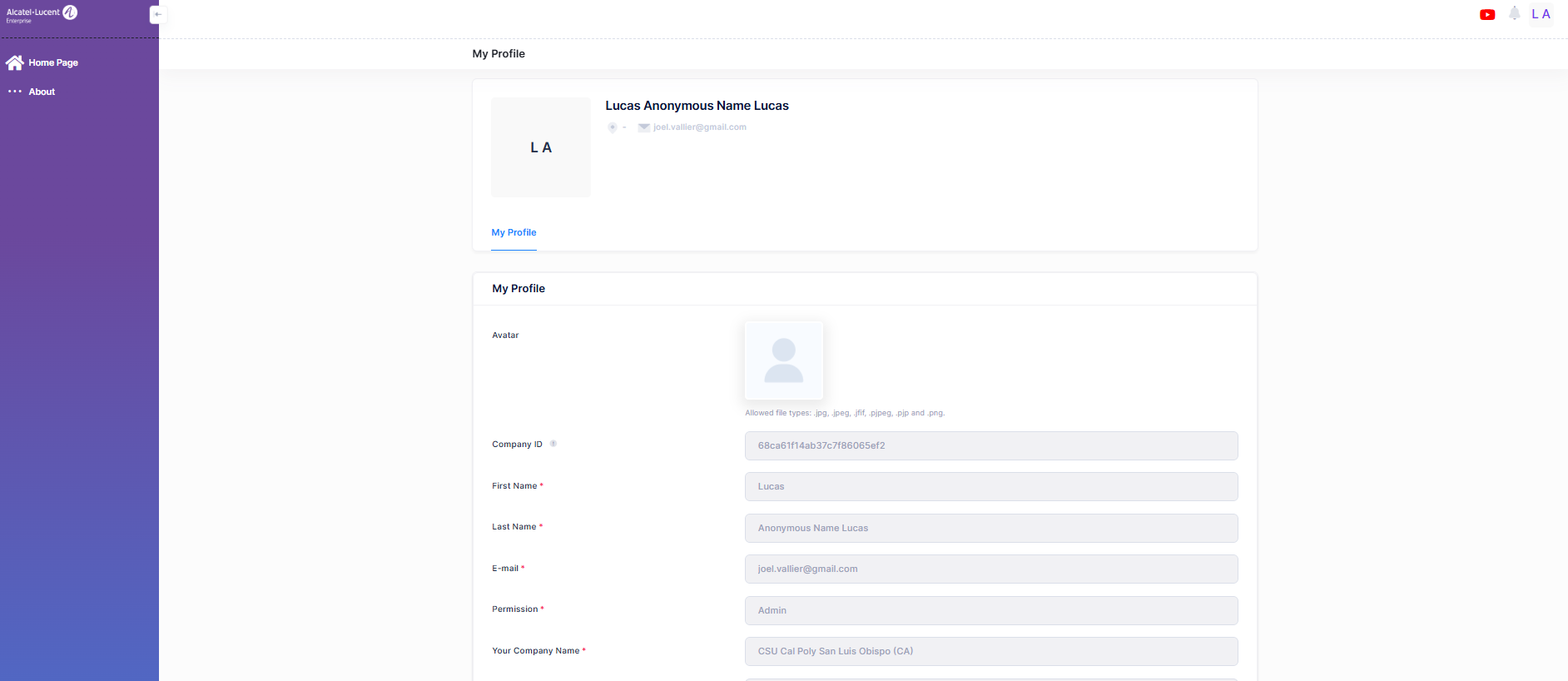
The following pre-filled field values are displayed.
-
Avatar - Click on the Camera icon and upload a .png, .jpg, or jpeg file.
-
Company ID - The unique Fleet ID provided to the technical support team for troubleshooting.
-
First Name - Displays the user's first name.
-
Last Name -Displays the user's surname.
-
E-mail - Displays the user’s e-mail ID.
-
Permission - Displays the user's permission type to access the Fleet company account (Admin, Viewer, Modifier, or None)
-
Your Company Name - Filled in when your account was created. Cannot be edited.
-
Country - You can edit your country by selecting a country from the drop-down menu.
-
City - Displays the city name. Optional.
-
Zip Code - Displays the city zip code. Optional.
-
Address - Shows the company street address. Optional.
To change your personal information, click the Changing Personal Information tab. This redirects you to the https://myportal.al-enterprise.com/s/um-profile page.
ALE users do not use this page to update their personal information.